Two-step login and two-factor authentication are not the same thing
You turn on "two-step verification" on a service. Every time you log in, it emails you a code. You enter the code. This feels like a meaningful security upgrade — two steps are required, after all. And it is an improvement. But it is categorically different from what security professionals mean by two-factor authentication, and understanding why helps you make better decisions about which option to use.
What two-factor authentication actually means
The "two factors" in 2FA refer to two different types of credential:
Something you know — typically your password. Something you have — a physical device, like your phone running an authenticator app or a hardware security key. Or something you are — a biometric like a fingerprint.
The key word is "different." Two-factor authentication is valuable because it requires something from two distinct categories. An attacker who has your password still can't get in without the second factor — which lives on a separate physical object they don't have.
An authenticator app generates time-based codes tied to your specific device. A hardware key requires physical possession. These are genuinely independent of your password.
Why email codes are weaker than they seem
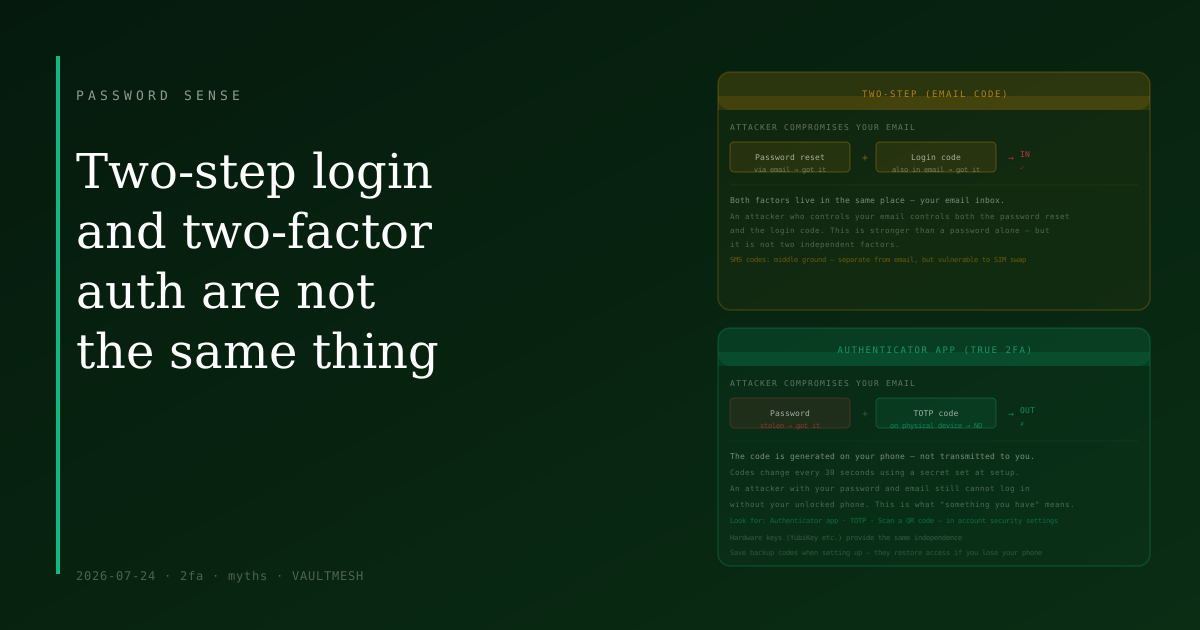
When a site sends a verification code to your email address, both the password and the code go through the same channel: your email account. If an attacker gains access to your email — whether through a phishing attack, a credential stuffing login, or a compromised recovery option — they can receive your account's password reset emails and your login codes simultaneously.
The "two steps" are not from two different categories. They are both things accessible to whoever controls your email inbox. This is meaningfully stronger than a password alone, because it requires the attacker to compromise two things rather than one. But it does not provide the independence that genuine 2FA offers.
SMS codes are a middle ground. They go to your phone via text rather than email, which separates them from your email account. They're better than email codes but still vulnerable to SIM swapping, where an attacker convinces your carrier to transfer your number to their device.
What changes with an authenticator app
When you use an authenticator app — such as those built into iOS, Android, or dedicated apps — the codes are generated locally on your physical device using a cryptographic secret set up during initial configuration. The codes change every 30 seconds and are not transmitted to you over any network channel. An attacker who has your password and your email address still cannot log in without your unlocked phone.
This is what the "something you have" factor is supposed to mean: a physical object the attacker doesn't possess. Email codes are more like "something you can access" — which is a weaker version of that guarantee.
What this means in practice
For accounts that matter most — email, banking, anything with financial access or that controls other accounts — an authenticator app is worth setting up. The setup takes about two minutes: you scan a QR code in the account settings, and from then on the app generates codes automatically.
Check whether the accounts you care about offer an authenticator app option in their security settings. The setting is often labeled "Authenticator app," "TOTP," or "Scan a QR code" rather than just "two-step verification." If those options exist, they're worth choosing over email or even SMS codes.
For accounts where you have no other choice, email codes are still better than no second step. The risk model is just different: you're protected against most attacks, but not against an attacker who has already accessed your email.
Backup codes matter here too: when you set up an authenticator app, save the backup codes the service provides. If you lose your phone, those codes are how you regain access.
The practical summary
Two-step verification using email codes: better than a password alone, but both factors live in the same place. An attacker who controls your email controls both.
Two-factor authentication with an authenticator app: requires something an attacker doesn't have — your physical device. A meaningful step up for accounts that warrant it.
Both options are available on most major services. The authenticator app is worth the two minutes it takes to set up.