Why security questions are often the weakest link
When you create a new account, some sites ask you to set security questions. "What was the name of your first pet?" "What city were you born in?" "What is your mother's maiden name?" These feel like a backup layer of protection — a second check that only you could pass.
In practice, they often work in the opposite direction.
The answers aren't as private as they seem
Security questions rely on facts about your life that supposedly only you know. That assumption breaks down quickly when you consider how much personal information is now publicly available.
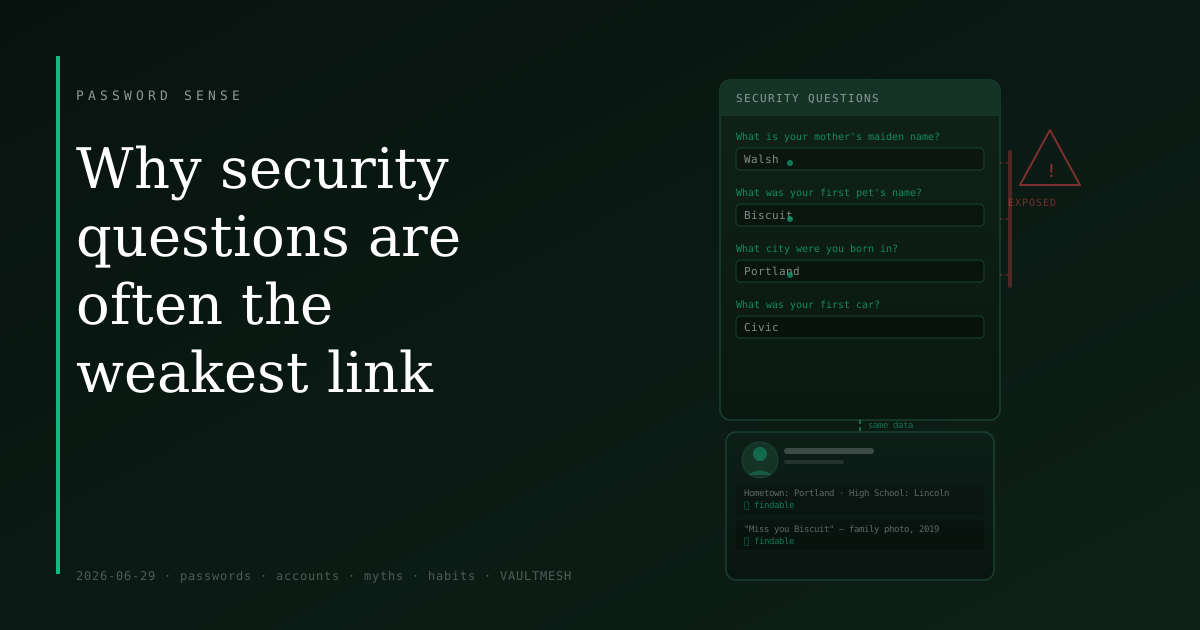
Your mother's maiden name might appear in a genealogy site entry, an obituary, or a Facebook family post from years ago. Your hometown and high school are often filled in on social media profiles. The name of your first pet might be something you mentioned in a birthday post or a throwback photo caption. None of this requires sophisticated techniques to find — a search engine and some patience will often do it.
This matters most not when someone tries to break into your account directly, but when they use account recovery. Many sites use security questions as part of the password reset flow: if you claim to have lost access, answering your security questions correctly can unlock the ability to set a new password. If an attacker can answer those questions from public sources, they can often take over the account without ever knowing your original password.
Why these questions exist at all
Security questions predate most people's social media presence. In an era when "what street did you grow up on" really was information almost no one outside your family would have, it was a reasonable fallback — a way to verify identity when a password reset email couldn't be sent because the user had also lost access to their recovery email.
The design made some sense at the time. The problem is that the standard list of questions hasn't changed much, while the answers to them have become far more exposed. What was private information in 2002 is often findable in 2026.
What to do about it
When a site requires security questions, you are not obligated to answer honestly.
The most reliable approach is to treat the answer like a password: make it random and store it alongside your credentials. Instead of answering "What was your first car?" with the actual car, you answer granite-loop-77-vessel and save that string in your password manager with the rest of your login details. No one can guess an answer that has nothing to do with your life.
If you don't yet use a password manager, a simpler approach still beats real answers: pick a set of made-up words you can remember and use them consistently for security questions. This is less secure than random answers, but far better than truthful ones that might be findable.
One thing to avoid either way: using the same real answers across multiple sites. If one site is breached and attackers find that your mother's maiden name is on file, they can try the same answer wherever else it appears as a question.
When you have a choice
Not every site treats security questions the same way. Some use them only as one factor among several. Others let you skip them entirely. A few still use them as the primary account recovery path, which is the weakest possible implementation.
If a site offers alternatives — a backup authentication app, a recovery code printed during setup, a secondary email — use those instead. They're not vulnerable to social media research in the same way.
Security questions are not inherently useless. The underlying problem is that the standard set of questions has answers that are guessable, searchable, or both. Treat your answers as you would any other credential: specific to the site, not drawn from facts about your real life, and stored somewhere you can actually retrieve them later.