What happens to your passwords if the password manager goes down
A common reason people hesitate before switching to a password manager is a reasonable one: what happens if the company goes away? What if the service is down when you need to log in? What if they get acquired, raise prices, or disappear entirely?
These aren't paranoid questions. They're worth thinking through before you commit to a system you'll depend on for everything.
The answers vary considerably depending on how a given password manager is designed.
The two main approaches
Most password managers fall into one of two camps when it comes to where your vault actually lives.
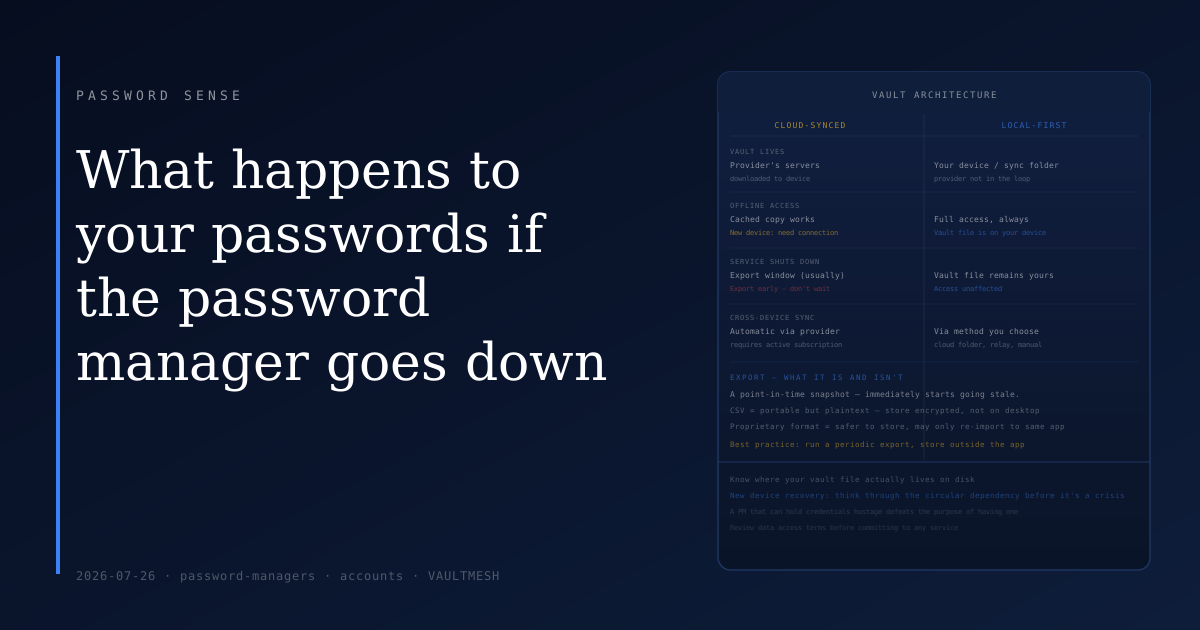
Cloud-synchronized. Your encrypted vault is stored on the provider's servers. The app on your device downloads and decrypts it locally, so you can use it offline for a while — but the primary copy lives with the service. If the service has an extended outage, you can usually work from a locally cached copy, but syncing new changes requires a working connection. If the service shuts down permanently, how much access you retain depends on whether they give users time to export.
Local-first. Your vault is stored on your own device or chosen sync location. The app reads directly from that file. It works without any connection to the provider, because the provider isn't in the loop. You can sync across devices using a method you control — a shared folder, a cloud drive you already have, or an encrypted sync relay you run yourself.
The distinction matters most when you're thinking about what happens in the worst case: the company going away, getting acquired by someone you don't trust, or changing their pricing to something untenable.
What export means
Almost every password manager lets you export your vault. This typically produces a CSV or a proprietary encrypted file containing your credentials.
The important thing about export is when to use it. Export is a point-in-time snapshot — it captures everything at the moment you export it, then immediately starts going stale. It's useful as an emergency backup, not as a living record. If you rely on an export file for access, you're relying on data that may be months out of date.
If you're on a cloud-only service and the company announces shutdown, export early and export often — don't wait until the last week when servers may be overwhelmed or access may be restricted. The better practice is running periodic exports (quarterly or after any major credential update) and storing the file somewhere encrypted.
The format also matters. A CSV export is portable but contains your passwords in plaintext and needs to be stored carefully — encrypted storage, not just sitting on your desktop. Proprietary encrypted exports are safer to store but may only be importable into the same product or a specific competitor.
Offline access in practice
Even cloud-based managers generally provide some offline access. If you've opened the app recently, your vault is typically cached locally. You can copy credentials from the cached vault without an internet connection.
The edge case that catches people is a new device. If your laptop dies and you need credentials to log into your accounts on a replacement device, you'll need access to the password manager service to pull down the vault — which requires a working login, which may require accessing your email, which may require credentials managed by the password manager. Thinking through this circular dependency before it's a crisis is valuable.
Local-first designs sidestep this by keeping the vault file somewhere you own. If your vault is on a sync-enabled folder you control, you can access it from any device that has access to that folder, without authenticating to any third party.
The practical answer
For most people using a reputable cloud-based password manager, the risk of suddenly losing access is low. Established providers give users substantial notice before shutting down, and export windows typically allow plenty of time to migrate.
That said, the people most aware of this concern often prefer local-first options — the kind where the vault file is yours to keep. VaultMesh, for instance, stores your vault locally and lets you choose your own sync method, so the continuity of the service doesn't affect your access to your data. If you stop using it, your vault file remains readable and exportable.
The practical steps that reduce this risk regardless of which tool you use:
Keep an encrypted export of your vault somewhere you can reach independently of the service — an encrypted drive or a folder outside the app's control. Know where your vault file actually lives on disk, whether that's a provider's cloud or a local file. Review what your password manager's terms say about data access and export during account closure.
The goal isn't to hedge against every scenario — it's to make sure that the tool you depend on can't hold your credentials hostage in circumstances you can't control.