How to make sure you downloaded the real app
App stores are not as carefully curated as people assume. Fake apps impersonating banks, cryptocurrency wallets, investment platforms, and popular services appear regularly. They can be well-designed, use official logos, include plausible descriptions, and sometimes show manufactured reviews.
When someone searches for their bank in the App Store or Google Play and taps the first result, they may not be downloading the bank's actual app. They may be downloading an app designed to look like it.
The stakes are higher than a typical phishing attempt. A fake banking app can capture login credentials and account numbers. A fake crypto wallet can steal private keys. The damage happens before the user realizes anything is wrong.
What the check actually looks like
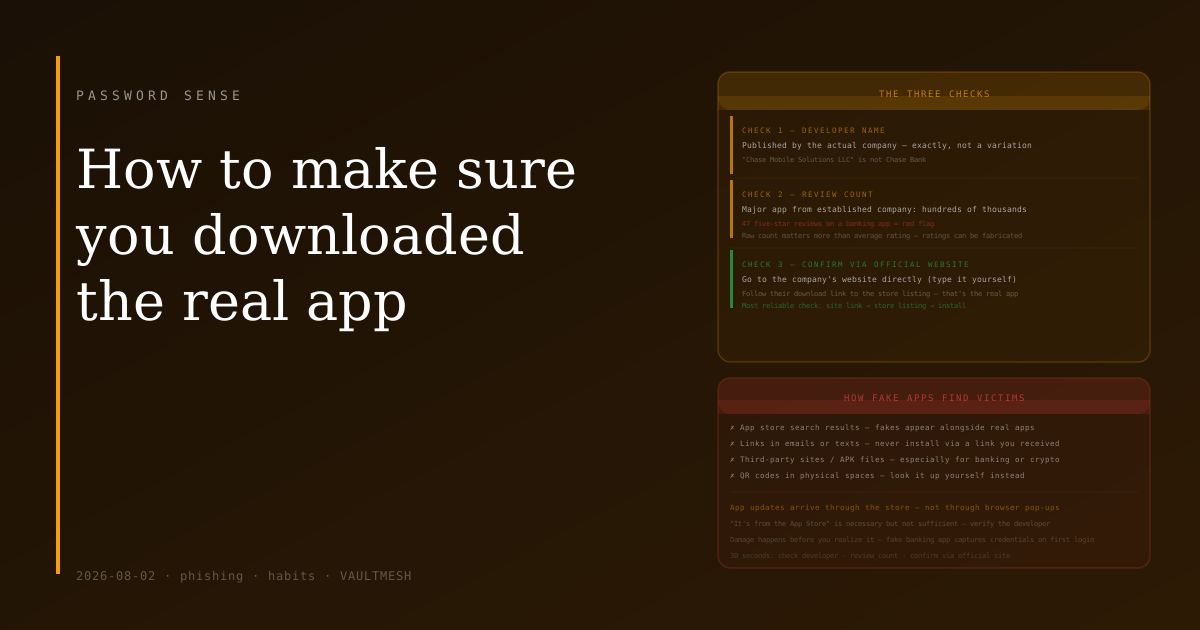
There are three things to look at before installing an app for anything sensitive.
Developer name. The listing shows who published the app. A real bank app will be published by the bank — Chase Bank, not "Chase Mobile Solutions LLC" or some variation that's close but not official. A real app from a major company is published by that company. When in doubt, compare the developer name against what's listed on the company's actual website.
Review count. A legitimate app from a major financial institution will have hundreds of thousands of reviews accumulated over years of users. A fake app might have a hundred reviews — some of which are often obviously fabricated. An app with 47 five-star reviews and a generic description warrants scrutiny. The raw number matters more than the average rating, which can be gamed.
Match to the official website. This is the most reliable check: go to the company's actual website (not a link from an email or text — type the address yourself or use a bookmark) and find the download link there. Most companies list their official app on their website with direct links to the App Store and Google Play. Following that link takes you to the real listing.
These three checks — developer name, review count, and confirmation against the official site — catch the vast majority of fake apps.
Where fake apps often find victims
Search results in app stores. Searching "bank of america" or "paypal" returns results where fakes can appear alongside the real app, sometimes above it if paid promotion or download manipulation is involved.
Links in emails or texts. A phishing email or SMS might contain a link that appears to go to an app store listing. The listing may be for a fake app, or the link may redirect to a site that serves a malicious APK. Neither is the official app. The rule: never install an app by following a link from an email or text. Go to the store yourself.
Third-party download sites. For Android, it's possible to install apps outside the Play Store by enabling "install from unknown sources." Some legitimate apps are distributed this way, but it removes all store vetting. Security-sensitive apps — banking, crypto, password management — should not be installed from APK files found on random sites.
QR codes in physical spaces. A QR code at a payment terminal or kiosk could link to a fake app download. The same rule applies: look up the app yourself rather than scanning a code you encountered somewhere.
Android vs. iOS
The App Store (iOS) has somewhat stricter review processes than Google Play, but neither is airtight. Fake apps have appeared on both platforms. "It's from the App Store" is not sufficient verification on its own.
On Android, the additional risk of sideloading (installing from outside the store) makes it worth checking that the "Install unknown apps" permission is off for apps that don't need it.
For existing installs
It's worth periodically checking that apps you have installed are still from the expected publisher — occasionally, legitimate apps get sold to different companies whose practices are less reputable. In your device's installed apps list, you can tap an app to see its listing in the store, including the developer name.
If you ever receive a notification to "update" an app through a website or email rather than the app store itself, ignore it. App updates come through the store, not through browser pop-ups.
The thirty-second habit
Before installing anything related to finances, payments, passwords, or account access: look up the app through the company's official website rather than searching the store directly. Then verify the developer name matches what you expected. Check the review count — if it seems low for an established company, look more carefully.
This takes about thirty seconds and eliminates most of the risk from fake apps. For accounts where a compromise would be serious, the check is worth it every time.