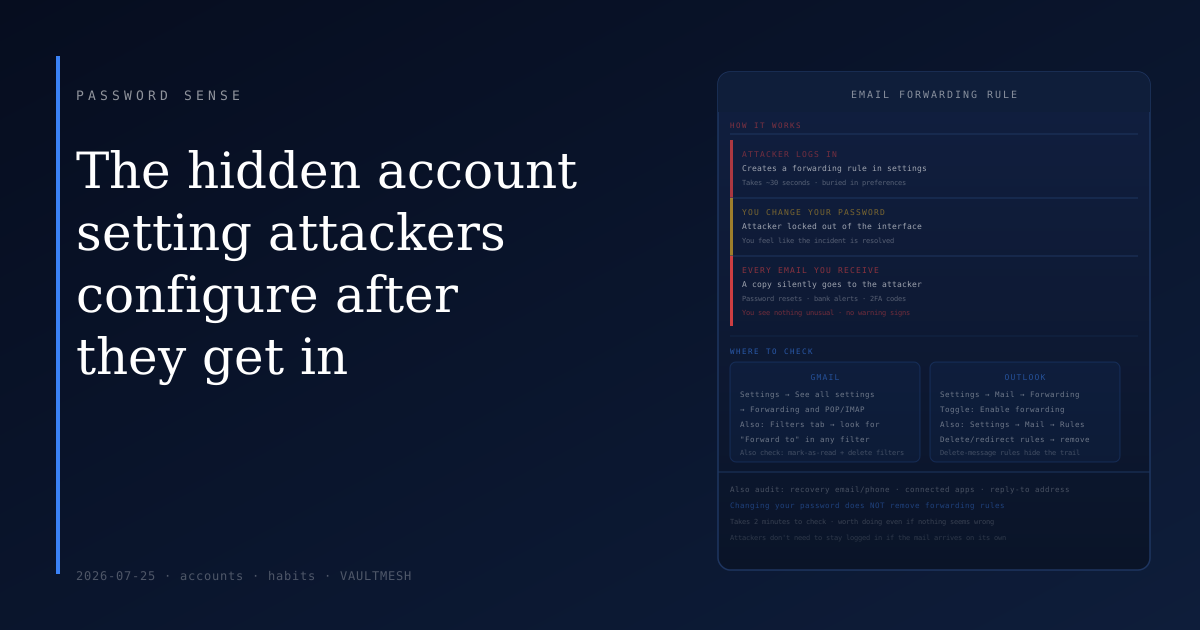
The hidden account setting attackers configure after they get in
When someone gains access to your email account, the obvious concern is what they read while they were in there. The less obvious concern is what they left behind when they were done.
A common move after a successful email compromise is to create a forwarding rule — a quiet setting, buried in account preferences, that automatically sends a copy of every incoming message to an address the attacker controls. Once it's set up, it runs silently. You receive your mail normally. You see no warning. Even after you change your password and lock them out of the interface, the rule keeps firing. You're sending them everything.
This isn't a sophisticated technique. It takes about thirty seconds to configure and requires no ongoing presence in your account. That's precisely why it's worth knowing about.
Why this matters more than it seems
Your email account isn't just a place where people send you messages. It's the recovery channel for nearly every other account you own — your bank, your work login, shopping sites, social media, everything. An attacker who receives forwarded copies of your email effectively sees any password reset link sent to you, any account notification, any verification code delivered via email. Changing the password on your email account breaks their interactive access, but it doesn't break a forwarding rule. The information keeps flowing.
This is also why auditing your forwarding rules is one of the first things to check if you suspect your account was accessed — and worth checking proactively, even if nothing seems wrong.
What to check in Gmail
Open Gmail settings by clicking the gear icon and selecting "See all settings." Navigate to the "Forwarding and POP/IMAP" tab. You'll see a section called "Forwarding" that lists any addresses your email is being automatically forwarded to. If you don't recognize an address there, remove it.
Also check the "Filters and Blocked Addresses" tab. Attackers sometimes use filters instead of forwarding rules: a filter that matches all incoming mail and marks it as read (so you don't see unread count notifications) while forwarding or labeling it. Look for any filter with "Forward to" in its action, especially ones you don't remember creating.
What to check in Outlook
In Outlook on the web, go to Settings → Mail → Forwarding. There's a toggle for "Enable forwarding" and a field showing where mail is being forwarded. If forwarding is on and the address isn't yours, disable it.
For rules in Outlook, go to Settings → Mail → Rules. Look for any rule with an action you don't recognize, particularly ones that forward, redirect, or permanently delete messages. Rules that delete messages are another tactic — the attacker reads everything first through forwarding, then the rule removes your copy so you're less likely to notice.
What else to look at
Forwarding rules are the most common thing to check, but an attacker with access to an email account can make several other changes worth auditing:
Recovery address and phone. If they've added a new recovery email or phone number, they can request a password reset later even after you've locked them out. Check these in your security settings and remove anything you don't recognize.
Connected apps. OAuth tokens granted to third-party apps sometimes persist after a password change. Go to the security section of your account settings and review which apps have access. Revoke anything unfamiliar.
Reply-to address. Some email clients allow setting a different reply-to address than your actual sending address. An attacker could configure this so that replies to your messages go to them instead of you. Check your compose settings if you're being thorough.
The core thing to understand
Email account compromises often don't look like break-ins because the attacker's goal isn't to disrupt you — it's to observe quietly. A forwarding rule is a way to maintain visibility without maintaining presence. They don't need to keep logging in if the mail arrives on its own.
This is part of why "my account wasn't acting weird" isn't reassuring evidence that nothing happened. Disruption would defeat the purpose.
Checking your forwarding rules takes less than two minutes. If you haven't looked at that setting in the last year — or ever — it's worth doing now, regardless of whether anything seems wrong.