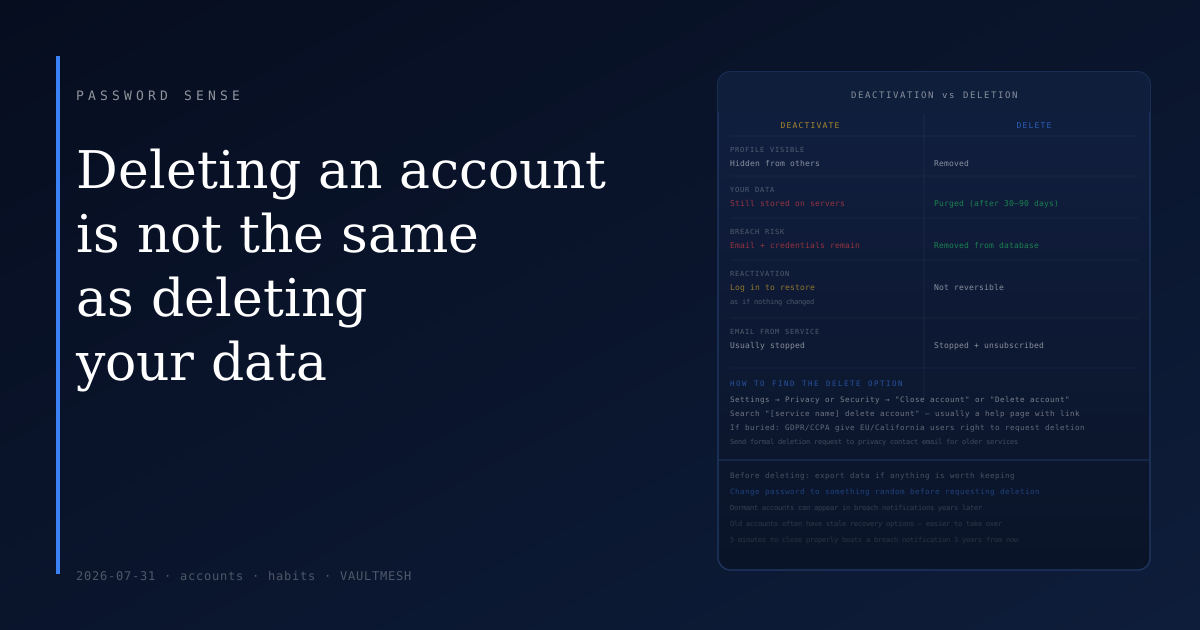
Deleting an account is not the same as deleting your data
You stop using a service. Maybe it's a forum you joined years ago, a food delivery app that no longer operates in your area, or a social network you grew tired of. You want to close the account.
The option you find first is usually not the one you want.
Deactivation vs. deletion
Most services offer a way to deactivate or disable an account, often presented alongside or instead of deletion. Deactivation typically hides your profile from other users and stops you from receiving emails. It does not remove your data.
Your username, email address, any content you posted, your activity history, and associated data remain stored on the service's servers. The account exists — it's just dormant. In many cases, logging back in with your old credentials will reactivate it as though nothing changed.
Deletion is different. True account deletion initiates a process that actually removes your data from the service's systems. The timeline varies — some services delete immediately, others take 30 to 90 days, and some retain backups for a longer period per their policy. But the process starts, and eventually the data is removed.
The reason the distinction matters: dormant accounts represent ongoing exposure. Your email address is stored, your password hash is in the database, and if that service is ever breached, your data is in the dump. The account you forgot about can generate breach notifications years later.
Finding the actual delete option
Services vary in how visible they make deletion. Some bury it several levels deep in account settings. Some require you to navigate to a specific page that isn't linked from the settings menu. Some require contacting support.
The pattern to follow: look in account settings under "Privacy," "Security," or "Account." Look for "Close account," "Delete account," or "Request data deletion." If you can't find it in the settings interface, search "[service name] delete account" — most services have a help page that describes the process, and some of those pages link directly to the deletion flow.
Several countries have privacy regulations that give users the right to request deletion of their data even when no simple interface exists. In the EU, GDPR gives users this right explicitly. In the US, California's CCPA provides similar rights for California residents against covered businesses. Knowing this can be useful for older or less user-friendly services — sending a formal deletion request to their privacy contact email is a legitimate mechanism.
What happens after you request deletion
Most services process deletion requests over a period of days to months. During this window, the account is typically disabled (you can't log in), and at the end of the period the data is purged from primary systems.
Backup retention is a common caveat. Many services will note that data may remain in backups for a period after deletion — 30, 60, or 90 days is typical — before those backups cycle out. This is industry-standard practice, not usually a reason to avoid deletion.
Some types of data may persist beyond account deletion for legal or compliance reasons — financial transaction records, for example, or content you posted that other users have interacted with. This is usually disclosed in the privacy policy.
Why old accounts are worth closing
Every active account is a credential that could be exposed in a breach. Services you haven't used in years may have weaker security practices, may be using the password you had before you adopted a password manager, and may not have 2FA available or enabled.
Old accounts also tend to have stale recovery options — phone numbers you no longer have, email addresses you no longer use — which can make them both harder to recover if needed and easier for an attacker to take over through recovery channel manipulation.
Closing accounts you no longer need reduces the number of places your personal data sits, the number of potential breach sources, and the number of credentials an attacker could use against you. It doesn't require doing them all at once — a reasonable practice is to close accounts when you think of them, or do a periodic review of what services you've signed up for.
A practical approach
Before deleting, export your data if there's anything you want to keep. Most major services offer a data export option — this downloads your account information, posts, photos, or other content before the account is closed. Use it for anything you might want later.
After exporting, look for the deletion option in settings. If you can't find it within a few minutes, search for the help page. If the service requires contacting support, send the request. Note the date so you can follow up if you don't receive confirmation.
Change the password to something random before deleting if the service stores a password. This means that even if the deletion process takes time, the old credential doesn't work during the window.
The five minutes it takes to properly delete an old account is worth it compared to discovering that account in a breach notification three years from now.