Not all data breaches are the same
When a notification arrives telling you your email appeared in a data breach, the right response is somewhere between ignoring it entirely and changing every password you own. Where exactly depends on one thing: what was actually in the breach.
Breach notifications often don't explain this clearly. They tell you a breach happened and that your account was involved, but not what that means for you practically. The answer matters.
What a breached database usually contains
When a service is breached, attackers typically steal whatever is in the database: email addresses, usernames, profile information, and in many cases, stored passwords. What isn't always clear is how those passwords were stored.
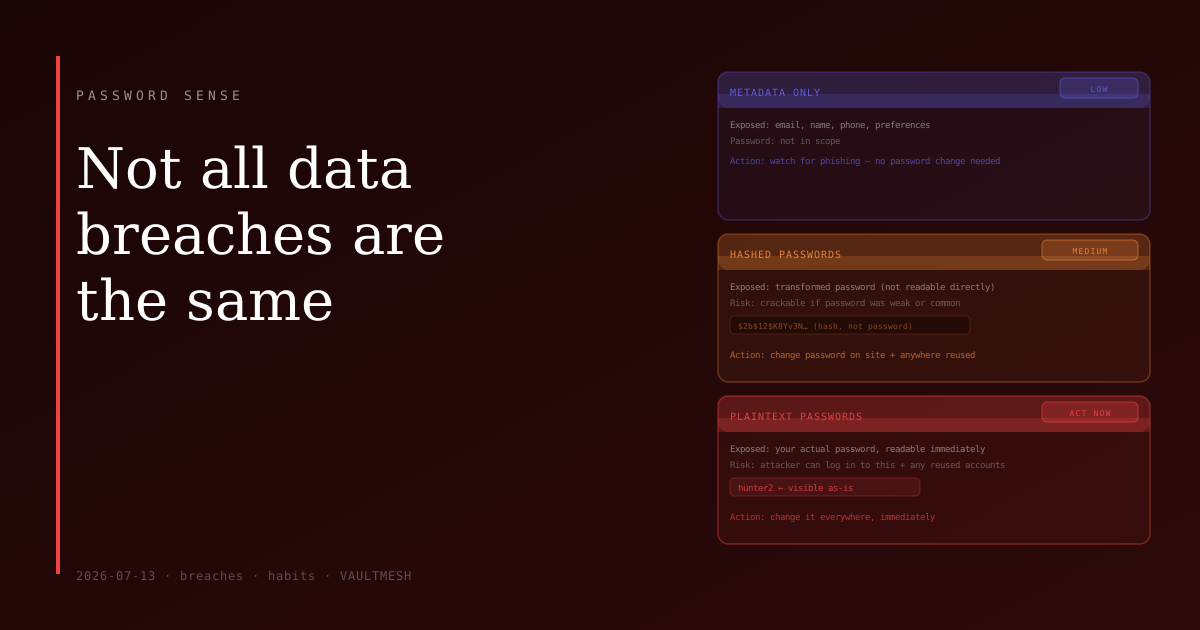
Three scenarios come up most often, and they require very different responses.
Plaintext passwords
This is the worst case. The site stored your actual password as typed, with nothing protecting it. If the database was stolen, the attacker has your password immediately and can use it without any additional effort.
If a breach notification mentions plaintext or unencrypted passwords — or if it's an older or smaller site that may not have taken security seriously — treat it as a plaintext exposure until you know otherwise. Change the password on the affected site right away. Then change it on any other site where you used the same password, because credential stuffing attacks — trying stolen username/password pairs across other services — are routine.
Hashed passwords
Most established services don't store your actual password. They store a transformed version of it, produced by running it through a one-way function called a hash. The service only stores the output, not the input.
This is meaningfully better than plaintext storage. But it doesn't mean the password is safe in all cases. Hashes can be cracked by running large lists of common passwords and patterns through the same function and looking for matches. How hard this is depends on two things: how the hashing was done (some algorithms are more resistant than others) and how strong your password was. A short or common password may be cracked quickly. A long, random one may never be.
The right response when passwords were hashed: change the password on the breached site, and change it on any sites where you reused it. Prioritize this if the password was weak.
Metadata only
Sometimes a breach doesn't expose passwords at all. It exposes the surrounding data: email addresses, phone numbers, names, birthdays, account preferences. Your credentials weren't in scope.
For these breaches, no password change is needed. The practical concern is phishing — attackers who know your email address is real may use it to send targeted scams. Watch for increased phishing attempts and be skeptical of any unexpected "urgent account notices" in the period after a breach.
What to actually do with a notification
Start by reading the notification carefully. It should specify what was exposed. Look for the word "passwords" or "credentials." If they're not mentioned, it's likely a metadata breach.
If you're not sure, or the notification is vague, check haveibeenpwned.com. It's a reliable tracker that tells you which known breaches your email address appears in and what each breach contained. It's a more informative source than many of the breach notifications themselves.
If passwords were exposed, the priority order is: change the password on the affected site first, then anywhere else you used the same password, then set up two-factor authentication on the affected account if you haven't already. If you use a password manager, it can usually flag accounts where you reused a password, making that step faster.
If it was metadata only, no immediate action is needed beyond staying alert to phishing.
The quick version
The key question after any breach notification is: were passwords exposed, and were they stored in plaintext or hashed? Plaintext means act immediately. Hashed means act soon, especially if the password was weak or reused. Metadata only means stay alert but no password change required.
That question turns a vague alarm into a specific to-do list.