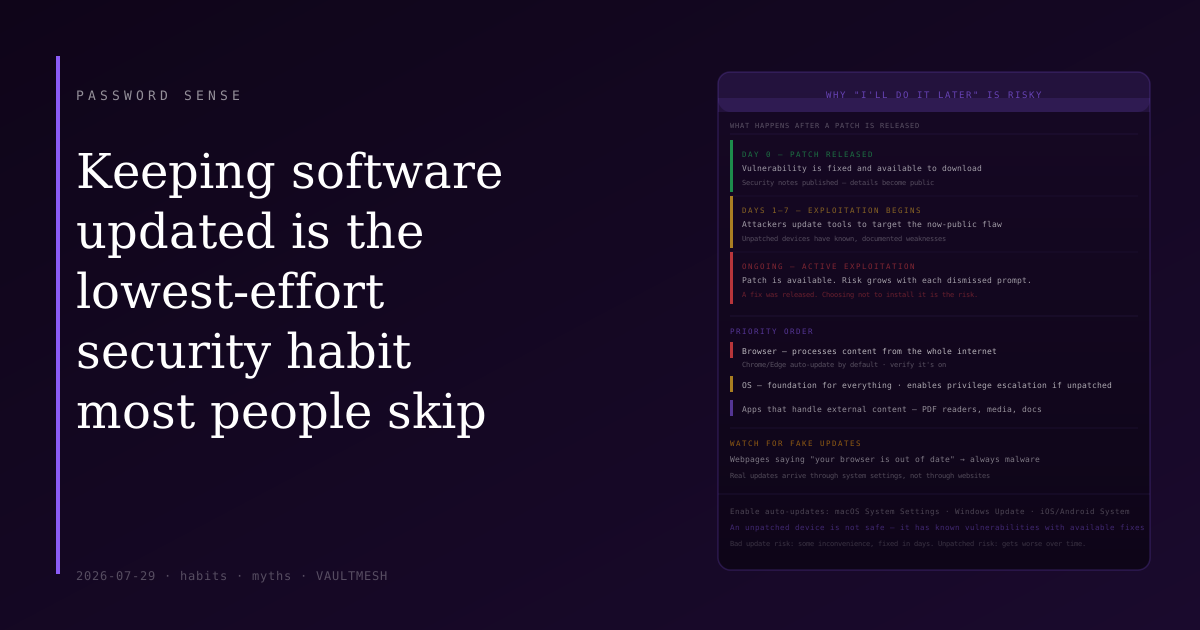
Keeping software updated is the lowest-effort security habit that most people skip
The update notification appears. You dismiss it. You're in the middle of something, the timing is bad, you'll do it later. Later comes and a new notification appears. You dismiss it again.
This is one of the most common security habits, and it's the wrong one. Not dramatically wrong — the risk on any given day is low. But over time, dismissing updates is one of the more meaningful ways people expose themselves to threats that their devices are otherwise prepared to handle.
Why updates matter more than they seem
Software vulnerabilities are discovered constantly. When a company finds one in their own product — or is told about one by a security researcher — they write a patch and release an update. The update contains the fix.
Here's the problem with delay: once a patch is released, the vulnerability it fixes becomes public knowledge. Security researchers publish details. The original discoverer writes about it. Attack tools get updated to target it. The window between "patch available" and "vulnerability being actively exploited" is often measured in days or weeks, not months.
This means that an unpatched device is a device with known, documented weaknesses — not theoretical ones. The risk isn't some future undiscovered exploit; it's attackers using techniques that are already published and already being used against people who haven't applied the available fix.
Patches fix bugs that are already public. The update wasn't the risk — delaying it was.
What gets exploited in practice
Browser vulnerabilities are among the most commonly exploited in real attacks, because your browser processes content from the entire internet and is therefore exposed to content from any attacker who can get you to visit a page. A browser vulnerability can allow a malicious webpage to execute code on your device without any interaction beyond visiting the page. Keeping your browser up to date closes these as they're discovered.
Operating system updates matter because the OS is the foundation everything else runs on. An OS vulnerability can allow attackers to escalate privileges or move from one part of your system to another. These patches often get bundled with other improvements, which is part of why updates can be large and slow — but the security portions are worth it.
Applications matter too, particularly ones that handle external content: PDF readers, media players, document editors. But the priority is clear: OS and browser first, then applications.
The legitimate concern about updates
There's a real reason people hesitate: updates sometimes break things. A macOS or Windows update occasionally causes issues with specific applications, changes something in the interface, or requires a restart at an inconvenient time. Enterprise environments are particularly cautious because they need to test updates against internal systems before rolling them out widely.
This concern is valid but often overweighted for personal devices. The average home user's risk from a bad update is some inconvenience — something stops working, and there's a fix within days. The risk from not updating is an available, exploitable vulnerability that gets worse the longer it sits.
Enabling automatic updates in the background solves most of this: the device updates during a restart you were already doing, and you don't have to think about it.
What to actually do
Enable automatic updates on your operating system. Both macOS and Windows have settings for this — usually in System Settings or Windows Update. Set them to download and install automatically where possible.
Do the same for your browser. Chrome and Edge update automatically by default; Firefox and Safari prompt you. Check that automatic update is on and not being suppressed by an old extension or setting.
For your phone: enable automatic updates in Settings → General (iOS) or Settings → System → System Update (Android). Phone OS vendors patch security vulnerabilities frequently, and mobile browsers and system apps benefit from these too.
For other applications: the update notifications you've been dismissing are fine to act on, even if the timing isn't convenient. Set a reminder if needed, but don't let them sit for weeks.
The main thing to let go of is the idea that a currently-running system is a safe one. If it's unpatched, it has known vulnerabilities. The patch is available. The question is just when.
One thing to watch for
Fake update notifications are a social engineering technique. A webpage that says "Your browser is out of date — click here to update" and prompts a download is almost certainly not a real browser update — it's trying to get you to install malware.
Real updates come through system settings, not through webpages. Your OS and browser update themselves through their own built-in mechanisms. If a website is telling you to update something, close the tab.