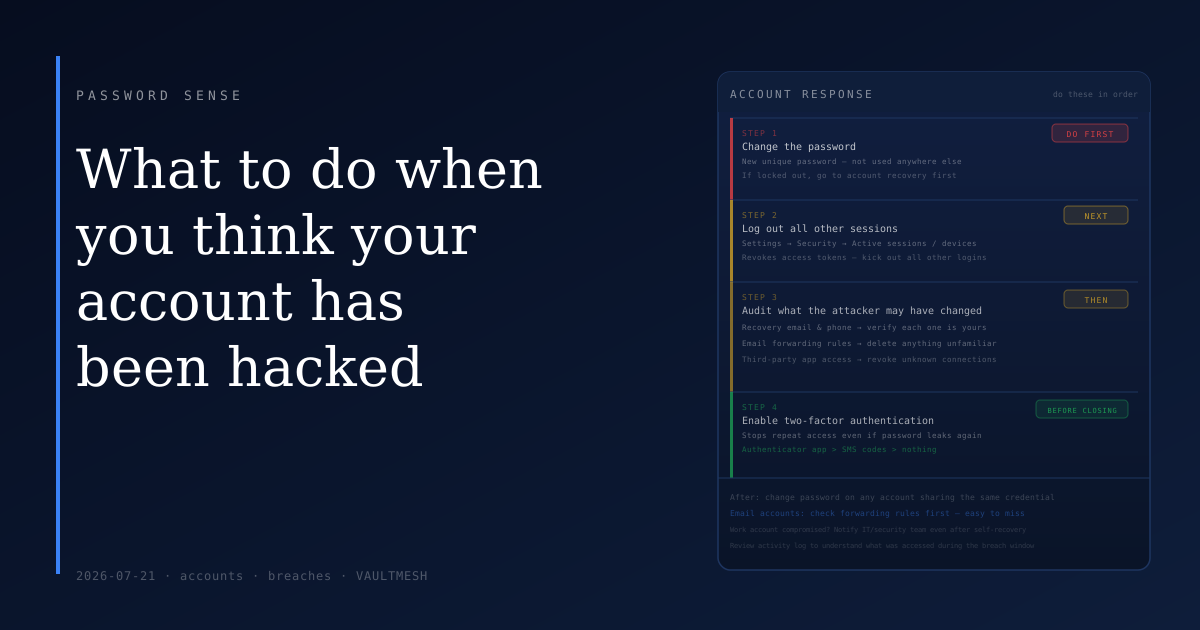
What to do when you think your account has been hacked
Something feels off. Maybe you got a login notification from a city you've never been to. Maybe a friend received a message you didn't send. Maybe you tried to log in and the password no longer worked. Whether you're certain something happened or just uneasy, the response is the same: a few specific steps, done in order.
Change the password first
Before anything else, change the password on the affected account. Don't wait to gather more information or figure out exactly what happened. Getting an attacker out starts here.
The new password needs to be one you haven't used elsewhere. If the old password was reused on other accounts, those accounts become the next risk — an attacker who has one credential will test it against other services.
If you can't log in because the password was already changed, go straight to account recovery. Most services offer recovery through a backup email or phone number. Use it. If you don't have working recovery options, contact the service's support — the process is slower, but it exists.
Log out everything else
After changing the password, find the active sessions page and log out all other devices. This invalidates any access tokens the attacker might have — even if they know the old password, active sessions can persist independently of a password change if you don't explicitly revoke them.
On Google, this is under your account settings → Security → Your devices. On Apple, it's in your Apple ID settings. On most banking and major apps, look under Security or Privacy settings. The label varies, but the function is the same: see who's currently connected and kick out anyone who shouldn't be.
Review what the attacker may have changed
Once you're back in control of the login, check the settings they might have modified to keep access.
Recovery email and phone number. Attackers often add their own contact information so they can regain access even after you change the password. Make sure every recovery option listed is one you recognize.
Email forwarding rules. This is easy to miss: in email accounts especially, attackers sometimes set up silent forwarding rules that copy every incoming message to another address. In Gmail, check Settings → See all settings → Forwarding and POP/IMAP. In Outlook, look under Mail → Forwarding. Delete anything you didn't set up.
Connected apps and authorized services. Third-party apps connected to your account retain access until explicitly revoked. Check the security or privacy section of your account settings and remove anything unfamiliar.
Enable two-factor authentication before you close the tab
If 2FA wasn't on before this incident, turn it on now. A compromised password is exactly the scenario 2FA is designed to limit — even if someone has your credential, a second factor they don't control stops them from signing in.
If the account you're securing is your email, treat it as the highest priority. Your email is the recovery address for most of your other accounts. 2FA here protects everything downstream.
An authenticator app provides stronger protection than SMS codes, which can be intercepted through SIM swap attacks. But SMS is still meaningfully better than no second factor at all. If an authenticator app isn't practical right now, SMS is still the right move.
After the immediate steps
Once the account is secure, think about any accounts where you reused the compromised password and change those too. Check whether anything sensitive was accessed or sent — most services have a recent activity log that can give you a sense of what happened during the window of unauthorized access.
If the account was a work login, let your IT or security team know, even if you've already resolved it on your end. They may need to take additional steps on the infrastructure side.
The most important thing is the order. Password change first, then sessions, then settings audit, then 2FA. Doing them in reverse order or skipping steps leaves gaps. A calm, methodical approach through the checklist is more effective than a rushed sweep.
If this happens to your email account specifically, treat the recovery settings audit as especially critical — check forwarding rules and recovery contacts before you assume the account is clean.